teamLab
- 4.6
- Rating
- 1.00M
- Installs
- Free
- Price

 Analysis by App-foxy
I approached teamLab as a companion for exploring teamLab exhibitions rather than as a conventional drawing or photo-editing tool. That distinction matters. It appears in the Art & Design category, but its purpose is tied to the teamLab exhibition experience, so its usefulness depends heavily on whether you are visiting, planning to visit, or simply curious about the work. After spending time with it, I see it as a focused companion app: free to install, easy to understand, and most rewarding when used alongside the physical or digital exhibition context it represents.
The app is developed by TeamLab and has built a sizeable audience, with more than a million installs and an average rating of 4.6 from roughly two thousand ratings. Those figures suggest that it has reached well beyond a small group of exhibition regulars. Still, popularity should not be confused with universal usefulness. Someone looking for a general-purpose sketchbook, design editor, or gallery-management tool will probably find the experience too narrow. Someone interested in teamLab’s visual world may find the focused approach much more appropriate.
How the app earns its place on your phone
I find it helps to decide what you want from an exhibition before opening the app: orientation, a prompt for conversation, or a way to reflect afterward. That choice keeps a phone from competing with the immersive work itself and makes this focused companion feel more purposeful. From there, the next question is how its role changes across a visit.
You May Also Like

 Blood Strike: 2.5 Anniversary
Blood Strike’s Loadouts Turn Every Drop Into a Tactical Gamble
A close look at Blood Strike’s custom loadouts: how fast access to signature weapons reshapes its battle royale rhythm, rewards preparation, and narrows the gap between fights.

 Pandora - Music & Podcasts
Pandora’s Music Is Easy to Start, but Harder to Recover
Pandora’s strength is its low-effort path from a seed to a station. Its weak spot is how much confidence it asks you to place in connection, setup, and quiet recovery.

 8 Ball Pool
 Is Built on Rivalries, Rematches, and Routine
A close look at the rivalries, rematches, shared routines, and unanswered safety questions that turn a quick pool match into a persistent mobile community.

 Samsung Music
’s Quiet Strength Is Playing What You Already Own
Its reach comes less from spectacle than from dependable access to a personal library. That simplicity is both the app’s strongest retention engine and its ceiling.

 AccuWeather: Weather Radar
AccuWeather Review: A Quick, Clear Forecast for Everyday Decisions
For everyday plans, the best forecast is the one you can understand quickly. AccuWeather makes rain timing, radar, and local conditions easy to act on, with a few trade-offs.

 Hill Climb Racing
Why Hill Climb Racing Still Turns Crashes Into One More Run
A tiny car, a bumpy hill and one more upgrade: Hill Climb Racing keeps resurfacing because its simple chaos makes every near-miss feel personal.
More From Our News Desk
View All News


A free companion with a very specific purpose
The clearest point about cost is simple: this is a free app. I did not have to pay to install it, and its value is therefore not about recovering a purchase price through frequent use. That makes it easy to try before deciding whether it belongs in my regular app collection. It also changes how I judge it. A free exhibition companion does not need to replace a professional design application; it needs to make the teamLab experience more understandable, memorable, or convenient.
The app is rated for Everyone, which makes it approachable for families as well as individual visitors. That broad age rating fits the visual and cultural role of the product, although parents should still think of it as an accompaniment to an exhibition visit rather than a complete art activity in itself. I would not install it expecting a structured course, a portfolio tool, or a deep creative workstation.
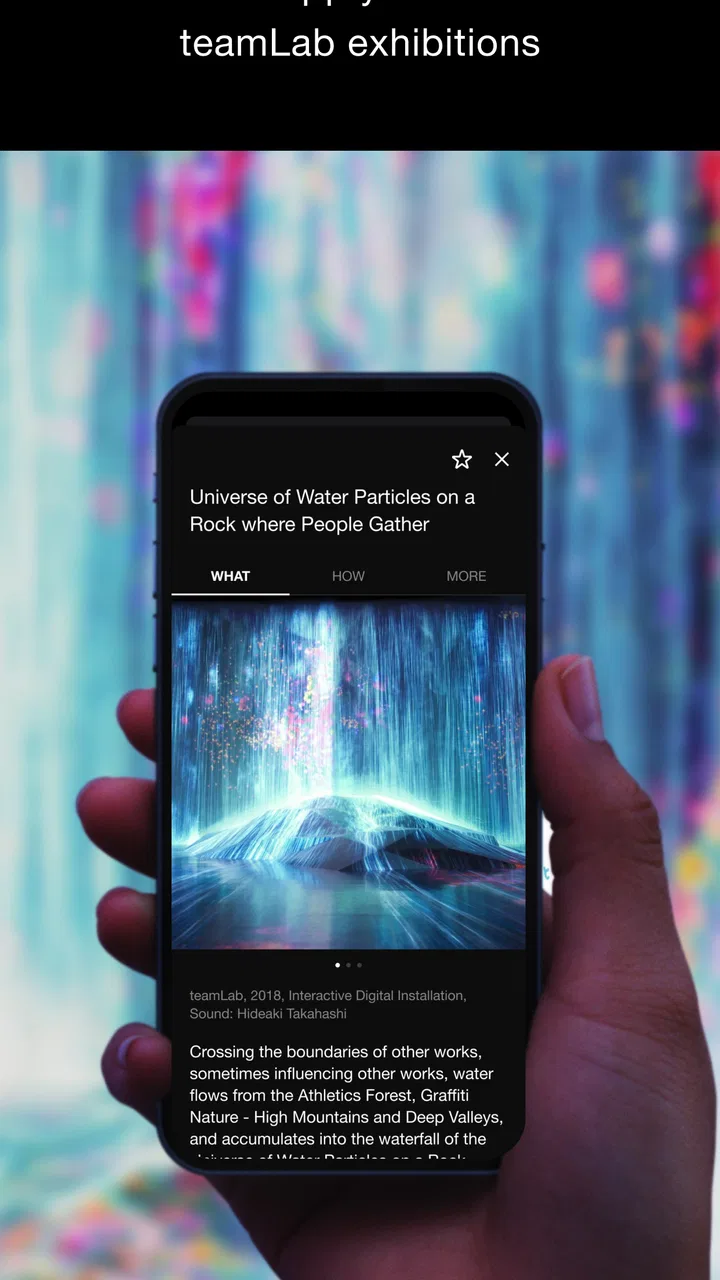
TeamLab’s store summary describes it as a teamLab Exhibition App, and that short description is more revealing than it may first appear. It signals that the app is connected to the exhibition brand instead of presenting itself as a standalone art utility. In practical terms, I would install it when preparing for a teamLab experience, keep it available during the visit, and revisit it afterward if I wanted to reconnect with the atmosphere or information associated with the exhibition.
What I found useful before an exhibition
Before visiting an immersive art show, I often want to know what kind of experience I am walking into. A conventional map or event page may answer logistical questions, but it rarely helps me understand the visual language of the work. This app is more useful in that preparatory phase because it keeps the focus on teamLab rather than surrounding itself with unrelated art content.
My practical tip is to open it before arriving, while I still have time to decide what I want from the visit. If I am going with children, I can use the app as a conversation starter: we can talk about light, movement, nature, and spaces that respond to people. If I am going alone, I can use it to set expectations and avoid treating the exhibition like a normal room-by-room gallery. That small change in mindset can make the visit feel less confusing and more intentional.
Another useful workflow is to treat the app as a pre-visit prompt rather than something to stare at continuously once inside the exhibition. Immersive installations are built around being present, and repeatedly checking a phone can work against that. I would use the app beforehand, put the phone away during the most absorbing parts of the visit, and return to it afterward for reflection. That is a more satisfying balance than trying to make the app the main event.
Its value during and after the visit
The strongest reason to keep a dedicated exhibition app nearby is continuity. A visit can be visually intense, and details that seemed obvious in the moment may blur together later. Having a teamLab-specific reference point gives the experience a thread that extends beyond the building. Even when I am not actively using it, the app can serve as a reminder of what I wanted to notice and what I might want to revisit mentally.
For families, that continuity can be especially helpful. Children may remember a color, movement, or room without having the vocabulary to explain why it stood out. An app centered on the same creative universe can help turn that memory into a conversation. I would not describe it as a replacement for hands-on exploration, but it can help a parent keep the discussion going on the way home.
For an art student or a designer, the value is different. The app is not a substitute for software that offers layers, brushes, vector tools, export controls, or professional color management. Its benefit is observational. It can encourage a closer look at how teamLab frames digital art as an environment rather than a static image. That makes it relevant as a reference for thinking about interaction and presentation, even if it is not itself a production tool.
Where it differs from ordinary art apps
Most Art & Design apps fall into familiar groups: drawing tools, image editors, inspiration feeds, coloring activities, or educational resources. I would not put this app in the same practical category as those products. A drawing app gives me control over the result. A gallery app gives me breadth. A tutorial app gives me a sequence to follow. This one is narrower and more brand-specific, with its value coming from connection to teamLab exhibitions.
That narrowness is also its advantage. A general art app can overwhelm me with unrelated material, while this experience keeps attention on one artistic identity. If I am already interested in teamLab, that concentration feels deliberate rather than limited. If I am not interested in the exhibitions themselves, the lack of broader tools or content becomes much more noticeable.
I would compare it with an event companion rather than with a mobile studio. That comparison sets more realistic expectations. It is not competing with a sketchbook, a photo editor, or a social network. It is trying to make one exhibition ecosystem easier to approach and remember. Judged on that basis, the free access is meaningful; judged as a general art application, it may feel underpowered.
Small habits that make the experience better
One habit I recommend is separating discovery from documentation. When I visit immersive art, my first instinct is often to photograph everything. That can leave me with many images but little memory of how the space actually felt. I would use the app to orient myself, then decide which moments deserve attention instead of turning the visit into a constant recording session.
A second tip is to use it with a specific question. For example, I might ask how the app presents the relationship between natural themes and digital environments, or how it helps a first-time visitor understand what makes teamLab different from a conventional gallery. Having a question gives the app a job and prevents passive scrolling.
A third trade-off is worth remembering: the more I want a broad selection of artists, techniques, and creative tools, the less suitable this app becomes. Its specialization is useful only when that specialization matches my interest. I would not recommend installing it as the first step for learning digital art. I would recommend it as a focused way to engage with teamLab’s exhibition identity.
Performance expectations and the current release
The current version is 3.8.1, and the listed minimum operating-system requirement is version 9. That gives the app a reasonably accessible technical starting point for people using older supported devices. I still prefer to install it before an exhibition rather than while standing in a queue or entering a venue. Doing so gives me time to open it, understand its layout, and avoid making the first interaction part of a rushed arrival.
One limitation of any exhibition-linked app is that its usefulness can feel uneven depending on timing. Before a visit, it may be a helpful orientation tool. During the visit, I may deliberately use it less because the physical environment deserves my full attention. Afterward, its role becomes reflective rather than essential. That is not necessarily a flaw, but it means the app may spend long periods unused between exhibitions.
I also would not expect it to satisfy someone who wants a complete record of every artistic detail in a formal research format. Its identity is more accessible and visitor-friendly than academic. For serious study, I would pair it with exhibition notes, artist interviews, or books rather than relying on one mobile companion.
Who will get the most value
I think the best match is a person planning to attend a teamLab exhibition and wanting a little more context around the experience. The app is also a sensible choice for families who want a simple way to introduce children to immersive digital art. Because it is free, there is little financial risk in trying it before a visit, and the Everyone rating makes it easier to share across a household.
It can also suit casual art fans who enjoy focused visual experiences but do not want to learn complicated creative software. The app’s appeal is not based on mastering controls. It is based on entering the teamLab world with a clearer sense of what to notice. That makes it approachable for someone who might be intimidated by technical art applications.
I would be more cautious about recommending it to a working designer, illustrator, or photographer who expects practical creation features. The category label may suggest an art-making tool, but the exhibition focus points elsewhere. If my goal is to draw, edit images, build a mood board, or export work for clients, I would choose a dedicated application instead.
It is also not the right choice for someone who rarely visits exhibitions and wants an app with daily utility. A free download is still not automatically valuable if I never return to it. In that situation, a general art-learning or creation app would probably offer a stronger habit-forming reason to open it every day.
My final recommendation
I recommend teamLab when the exhibition connection is the reason you are interested. The free price removes the main barrier to trying it, and the app’s focused identity makes more sense than a crowded collection of unrelated art features. I especially like it as part of a three-stage routine: explore it before the visit, stay present during the installations, and use it afterward to continue thinking about what you saw.
My recommendation becomes much weaker if you are searching for a standalone art tool. In that case, the usual alternatives are better because they let you create, edit, organize, or study art directly. This app delivers a different kind of value: it extends a specific exhibition experience rather than replacing a creative workspace.
TeamLab has been available since June 10, 2018, and the continued presence of a current release suggests that it remains an active part of the exhibition ecosystem. I would not install it simply because it sits in the Art & Design section. I would install it because I want a more connected way to approach teamLab’s work. For that audience, it is an easy, low-commitment recommendation. For everyone else, skipping it is reasonable and choosing a broader art app will likely be the better decision.
FAQs for teamLab
01What is teamLab and what can I do with it?
teamLab is an innovative app that blends art with technology, offering users an interactive digital art experience. Users can explore a variety of immersive artworks and exhibitions, interact with digital environments, and even create their own art pieces. Perfect for art enthusiasts and those interested in digital creativity, it offers a unique, engaging experience.
02Is teamLab free to use or does it require a purchase?
teamLab offers a mix of free and premium content. While users can access a range of free exhibitions and features, some exclusive content or advanced tools may require in-app purchases or a subscription. This ensures that users can enjoy basic experiences for free while having the option to explore more advanced offerings.
03What devices are compatible with teamLab?
teamLab is designed for both Android and iOS platforms, making it accessible to a wide range of devices, including smartphones and tablets. For the best experience, it is recommended to use devices with updated operating systems and sufficient processing power to handle the app’s interactive features smoothly.
04Does teamLab require an internet connection to function?
While teamLab can be used offline for some features, an internet connection is recommended for full functionality. Accessing new exhibitions, downloading updates, and sharing your creations with others might require online connectivity. Offline usage might limit access to certain dynamic content or updates.
05Is teamLab suitable for all age groups?
teamLab is designed to be family-friendly and suitable for users of all ages. Its interactive and educational content can engage children, while adults can appreciate the artistic and technological aspects. However, parental guidance is advised to ensure younger users navigate the app safely and make appropriate in-app purchases.
Pros
- Stunning visual art installations.
- Interactive user experience.
- Frequent updates with new content.
- Intuitive and easy-to-navigate interface.
- Available in multiple languages.
Cons
- Requires a high-performance device.
- Large app size can affect storage.
- Some features need internet access.
- Occasional bugs in new updates.
- Can drain battery quickly.

teamLab
Gallery